Don’t hesitate to contact us:
Forum: discuss.graphhopper.com
Email: support@graphhopper.com
A few years ago, we wrote a tutorial to show you how to model a traveling salesman problem with a week-planning horizon. Since then we have been improving our API a lot and I would like to show you how easy it is now to model this with driver shifts.
For example, suppose you have ONE employee who has to visit 25 customers over the next week. Let us also assume that the employee has certain daily working hours and the customers to be visited have several time slots. Your task is to plan his routes from Monday to Friday in such a way that the total transport costs are minimized. The result can be as follows:
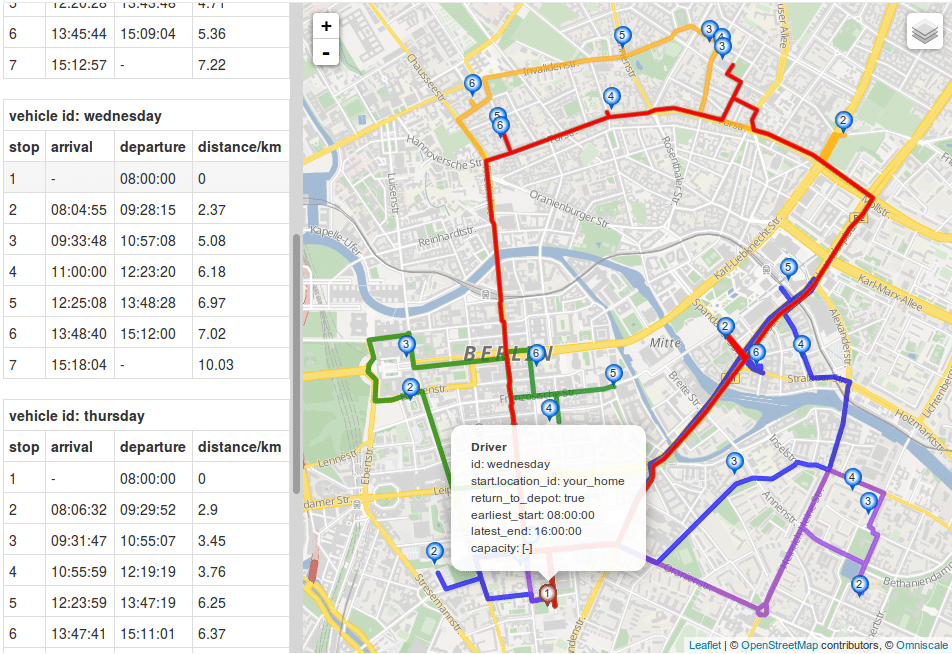
In our documentation you will find the general setup of the Json request and how to submit this request to our servers. In the following I will show step by step how to model the above problem..
Suppose the employee has a car and the capacity doesn’t matter, then your Json specification should look like this:
"vehicle_types":[
   {
      "type_id": "car_type",
      "profile": "car"
   }
]
Therefore you need a “type_id”, with which you can refer to it in your vehicles. In addition, you need to specify the profile “car” (you can read more about the profiles you can select here). In this way, transport times and distances are calculated based on the road network. The results correspond exactly to what you get when working with our Routing API and GraphHopper Maps.
Let us assume the worker can work from Monday to Friday. Now you specify the time either with the recommended Unix time stamp (the number of seconds since 1970-01-01) or for example, you count the seconds from Monday morning 00:00 and define the whole week in seconds. For example, Monday 9am is then represented by 9hour * 3600sec/hour = 32400sec. In turn, Wednesday 1pm corresponds to 2day * 24hour/day * 3600sec/hour + 1day * 13hour/day * 3600sec/hour = 219600sec.
Let us also assume your worker can work 8 hours per day and need to start at 8am. Then you can define your vehicles as follows:
"vehicles": [
{
   "vehicle_id": "fieldworker-1",
   "type_id": "car_type",
   "shifts": [
      {
         "shift_id": "monday",
         "start_address": {
            "location_id": "your_home",
            "lon": 13.39238003043599,
            "lat": 52.50385692772726
         },
         "earliest_start": 28800,
         "latest_end": 57600
      },
      {
         "shift_id": "tuesday",
         "start_address": {
            "location_id": "your_home",
            "lon": 13.39238003043599,
            "lat": 52.50385692772726
         },
         "earliest_start": 115200,
         "latest_end": 144000
      },
      ...
      {
         "shift_id": "friday",
         "start_address": {
            "location_id": "your_home",
            "lon": 13.39238003043599,
            "lat": 52.50385692772726
         },
         "earliest_start": 374400,
         "latest_end": 403200
      }
]
}
]
According to the above example, your vehicles always start and end at the location of “your house” (the coordinates must be given in longitude/latitude). If you want to allow your employee to end his route at a different location, simply enter an “end_address”.
Customers can be specified as ordinary services much like this:
"services": [
   {
      "id": "customer-id",
      "name": "visit pharmacy",
      "address": {
         "location_id": "customer-location-id",
         "lon": 9.999,
         "lat": 53.552
      },
      "duration": 3600
   },
...

]
Here, it is assumed that a visit takes 1 hour (3600 seconds). If this customer can only be visited on Tuesday or Friday, you can assign specific time windows to your services. Let us assume this customer can only be visited on Tuesday. Furthermore, you can only visit him from 9am to 11am or from 2pm to 4pm then you need to specify multiple time windows like this:
"service": [
   {
      "id": "customer-id",
      "name": "visit pharmacy",
      "address": {
         "location_id": "customer-location-id",
         "lon": 9.999,
         "lat": 53.552
      },
      "duration": 3600,
      "time_windows": [
         {
            "earliest": 118800,
            "latest": 126000
         },
         {
            "earliest": 136800,
            "latest": 144000
         }
      ]
   },
...

]
If you have more visits than your worker can serve in a week, you might want to prioritize certain visits over visits that can be postponed. You can do this by assigning priorities (1 = high prio, 2 = normal (default) prio, 3 = low prio) to your jobs, just like this:
"services": [
   {
      "id": "customer-id",
      "name": "visit pharmacy",
      "address": {
         "location_id": "customer-location-id",
         "lon": 9.999,
         "lat": 53.552
      },
      "duration": 3600,
      "priority": 1
   },
...

]
Finally, you must specify your optimization goal. If you solely want to minimize overall completion time, specify it like this
"objectives" : [{
   "type": "min",
   "value": "completion_time"
}]
If you want to play around with vehicle (type) definitions like profiles and operation times or customer specifications like time windows etc. here you can find an entire example in our API Explorer. Just click ‘send’ and analyze it on the map or at the raw json data and table.
Congratulations! You should now be able to model a simple traveling salesman with a week planning horizon and driver shifts. If you want to know, how you can refine your optimization goal to get a more balanced solution in terms of working time or if you want to add additional relations between your visits, e.g. customer A need to be visited directly after customer B, visit our documentation site or just asks questions in our forum.
Happy routing!
Today we are proud to announce another big improvement of GraphHopper’s Directions API: We’ve added turn restriction support to our routing solutions!
The time it takes to go from one place to another depends on how far we need to go (distance), and how fast we travel that distance (speed). The type of road we’re traveling on impacts our speed (think about the difference between driving on a steep and windy gravel road in the mountains, versus driving on a paved, flat highway with six or more lanes). Every trip presents a unique mix of variables, and routing engines like the open source GraphHopper routing engine, the Open Source Routing Machine or Valhalla are specially designed to use these variables to find the most optimal sequence of roads between origin and destination.
Besides the time spent driving, we often spend a significant amount of travel time on turning between roads, waiting at traffic signals, or taking u-turns after a wrong turn. In technical terms, we call these contributions to the travel time the ‘turn times’ or ‘turn costs’. Sometimes, certain turns are hampered, obstructed, or otherwise not possible. Examples might include junctions with ‘no left turn’, ‘straight only’ or similarly restrictive traffic signs. Some junctions might be physically too narrow to turn around when driving a long truck. These examples refer to what we call ‘turn restrictions’.

Dealing with turn costs and restrictions adds a lot of complexity to the route calculation. For every junction, one has to consider the different directions from which one may approach. This increases the number of possible routing states the routing algorithm has to keep track of, which then requires more computing time, and computer memory.
GraphHopper products aim to provide high performance route calculations because for many logistics applications, one often needs to calculate many routes (up to millions) at a time. To this end, GraphHopper uses very sophisticated algorithms that can calculate hundreds of thousands of routes per second on a single core.
Handling turn costs within these specialized solutions makes this an even more difficult problem to solve. However, including turn costs is not always necessary to perform realistic route calculations. For example, waiting times at traffic signals can be modeled by reducing the average travel speed in city areas. Turn times (or even turn restrictions) become less important when the travel points are far from each other or the route mostly consists of driving around the countryside in a more or less straight line. Similarly, many of our Route Optimization API users are mostly interested in the calculated order of the service locations. In this context, turn costs are less important than in, say, vehicle navigation. Accordingly, GraphHopper’s Direction API has focused on providing the fastest possible route calculations excluding turn costs.
Of course, there are many situations where handling turn costs is crucial. Last year we made a lot of progress in this direction, and were able to add turn cost support for GraphHopper’s fastest routing algorithm (Contraction Hierarchies, CH). Previously, this was only supported for the flexible and hybrid routing modes. With the enhanced CH algorithm, the GraphHopper engine now achieves fast routing performance even when including turn costs! To be clear, calculating this way is about two to three times slower than routing without turn costs, but for most applications, it is indeed fast enough. With that said, including turn costs remains optional; you can enable turn restrictions at the cost of relatively slower routing, or disable it for maximum query speed. Fast, or faster? It’s your choice now!
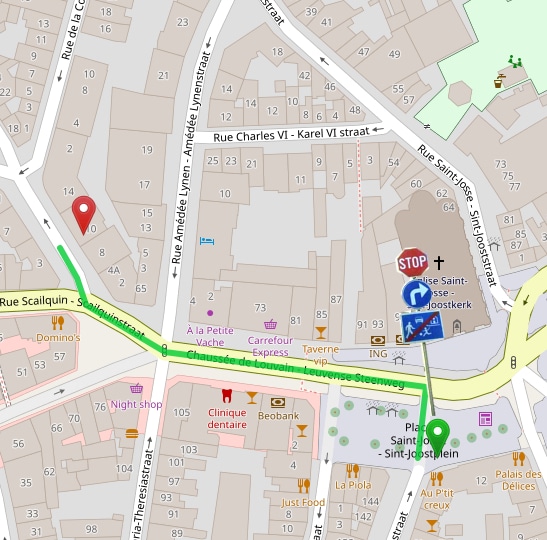
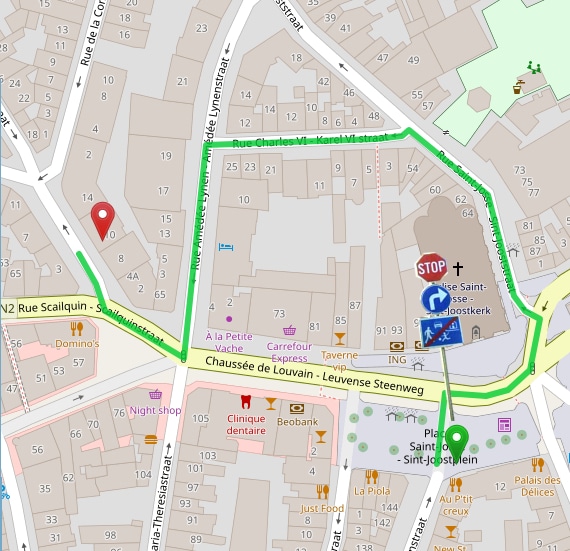
There’s a drawback for our new algorithm: it takes significantly more time, processing power, and computer memory to generate the index data required for such fast query times. Now here’s the good news: you don’t need to worry about these deployment issues–we took care of that already! We now support turn restrictions for our hosted Routing, Isochrone and Matrix APIs on our world-wide routing instances at no additional cost. We obtain the turn restriction data from OpenStreetMap, which has very good coverage of law-enforced turn restrictions for many areas. Note that, so far, we only offer turn restriction support for the OpenStreetMap network and not yet for the TomTom network. Take a look at our documentation for more details.
There is yet more to come. In the last months we have improved much of the routing engine’s turn cost-related architecture, and we are working towards making the turn cost model widely customizable, similar to the way we did for the weighting of roads recently (read more about that here). This would then, potentially, allow for “penalizing” turns or adjust the turn costs based on vehicle type and/or driving preferences. Also, we are hoping to fix a few lingering gaps, like supporting the heading and pass-through parameters for speed mode and map-matching with turn costs.
Don’t forget–trying our hosted service is free! Simply sign up to get an API key here, or, if you’re a router like us, feel welcome to get personally involved with our open source projects!
Happy Routing!
Cover photo by Ian Panelo from Pexels
