Don’t hesitate to contact us:
Forum: discuss.graphhopper.com
Email: support@graphhopper.com
For a decade, I’ve wanted to build a simple game that shows why the Traveling Salesman Problem is fun to work on. Something I could pull up at a party when someone asks “so what does your company actually do?” Something my kids could play and understand why dad stares at vehicle routing problems all day.
I never built it. Not because it’s technically hard, it’s a straightforward web app. But because I’m a backend person. I can write Java, I understand and implement optimization algorithms, I’ve spent years building jsprit (an open source Java library to solve vehicle routing problems) and our GraphHopper API together with my co-founders Peter and Michael. Making something look good in a browser? Not my skill. And after 10 years of running a company, not something I had time to learn.
What changed
A few days ago, Alphabet released Antigravity. I started playing with it, and quickly remembered the TSP game I’d wanted to build for years.
I used Antigravity as my IDE, with Claude and Gemini to build the frontend and deploy it via Firebase. The stack is React, Vite, Zustand, Tailwind CSS, Framer Motion, with Leaflet for the map, Omniscale for tiles (we already had a paid license), and our API for routing and optimization.
AI wrote the whole frontend. I guided it, describing what I wanted, reviewing the output, asking for changes. But I didn’t write the code myself.
Did I understand what AI wrote? Mostly. I reviewed the code, but I won’t pretend I understood every line. It worked, and I could follow the structure well enough to guide it.
Total time: about 4 hours. Most of it was iteration, not debugging.
What worked, what didn’t
Some things AI handled effortlessly: setting up the project, the map integration, the click-to-add-stops logic, the design, deployment to Firebase. It even asked Nano Banana to design a favicon.
What slowed me down wasn’t debugging, it was Gemini’s rate limits. I kept hitting them mid-flow and would have gladly paid for a higher limit, but Alphabet didn’t offer a paid plan for Gemini 3 within Antigravity yet. So I switched to Claude here and there. Antigravity makes that easy, you just select another model and keep going.
Gemini started with CARTO Dark Matter. Looks great, but the free tier licensing felt like a gray area. The game isn’t marketing, but it does show what we do. I switched to Omniscale’s grayscale tiles and inverted them with CSS to get the dark look.
Real users, real feedback
My co-founder Peter sent it to his brother. The feedback was immediate: he didn’t know if it used real roads or straight lines, and there was no reward when you achieved a perfect match.
So I added confetti. And a toggle: road network or “as the crow flies” (Haversine). Crow fly is now the default, no need to think about road network topology. This also required a new profile in our API for crow fly distance calculation.
One thing that surprised me
When I sent the game to my co-founders, Michael immediately beat the optimizer with 5 stops. His reply: “Bow before the mighty TSP master!”
Five stops — 120 permutations. The optimizer should solve this to optimality every time. And it did, just not for pure route duration. Our default optimization objective has evolved over the years. It doesn’t just minimize route duration — it includes things customers complained about. For example, drivers don’t want to pass by stops only to return 3 hours later just to save a few seconds of travel time. On small instances, those trade-offs can make a human “win” this game on pure travel time.
So I added a new objective function that solely minimizes route duration. It has limited practical use, but for this game I didn’t want users “winning” every second round.
I didn’t expect a toy project to require two changes to our production API. But it resulted in a few refactorings to simplify such changes in future, our software improved.
The game
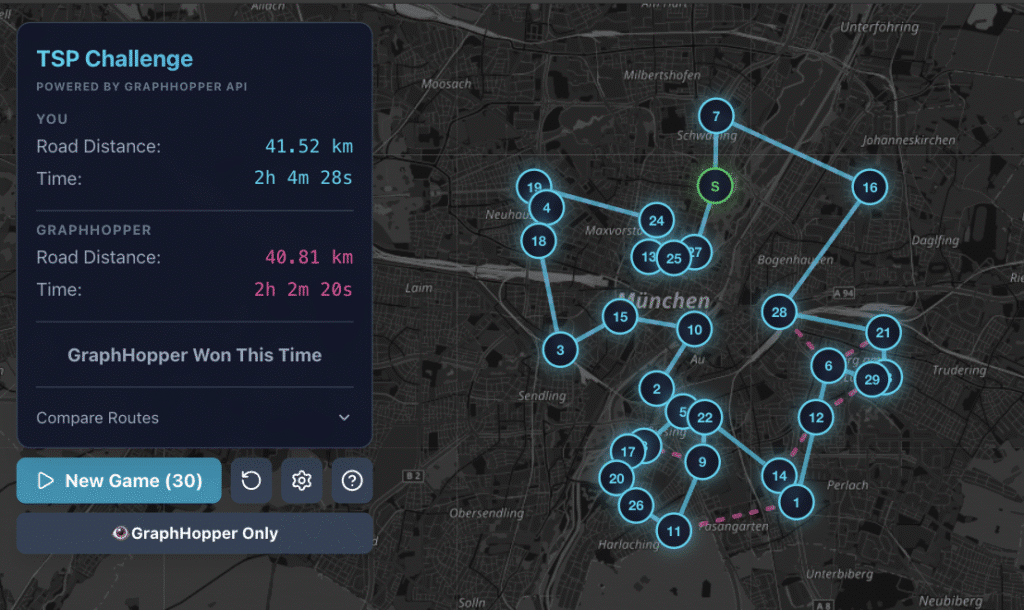
It’s simple: you see a map with stops. Click the start location first, then draw a route visiting all stops and returning to the start. The optimizer shows you its solution. You compare.
By default, the game starts with 10 stops. In settings (gear icon) you can configure this from 5 stops (easy) to 50 stops (good luck). It also works pretty well on mobile.
With 5 to 10 stops, most people do pretty well. With 20, matching the optimizer gets harder. With 30 to 40 stops, you realize why this problem is NP-hard — and why software exists to solve it.
Try it: https://tsp-game.graphhopper.com/
Source: https://github.com/graphhopper/tsp-game
What I took away
For years, I had a clear idea but couldn’t execute it because of a skill gap. AI tools closed that gap — not by replacing my judgment, but by handling the parts I couldn’t do well.
If you’ve been sitting on an idea because “I’m not a frontend person” — the barrier is much lower now. And sometimes, building even a toy will teach you something about your own production system.
I’m Stefan, one of the founders of GraphHopper.
P.S. Yes, Claude helped write this article. We built the game together, only fair we write about it together.
